






Most AI voice generators sound robotic. I paid for and tested over 50 tools to find the ones that sound natural.
(I use this)
- Sounds human: Voices breathe, show emotion, and pause naturally. Used by most successful faceless YouTube channels.
- Free plan: about 10 min/month. Paid plans from $6/month.
- 10,000+ voices - large community library, voice cloning, and voice changer. Eleven v3 supports 70+ languages
- Auto AI Dubbing in 29+ languages in original speaker's voice. Auto-detects multiple speakers.
- Bulk audiobook generation, AI SFX, AI music, API with <100ms latency.
- 500+ voices in 100+ languages with custom pronunciations
- Pro V2 voices follow natural-language directions for emotions, pace, accents, and non-verbal delivery
- All-in-one video editor with AI subtitles, SFX, stock footage, and scriptwriting - no need for Descript or CapCut
- Unlimited voice cloning in Pro plan
- Free option: a 14-day Pro trial, followed by a limited free plan
- Best at accents and localization - especially African American voices.
- 300+ multilingual voices across 33+ languages
- Falcon 2 API model: improved voice quality, latency, and generation reliability
- 'Say it My Way' mimics your exact tone, speed, pitch, and emotion
- Enterprise-ready: API, voice cloning, SOC2 compliance, IPA pronunciations
- Integrates with Google Slides, PowerPoint, Adobe Audition, Canva
- Free plan: 10 min/month to test
- 500+ voices in 100+ languages with custom pronunciations
- Pro V2 voices follow natural-language directions for emotions, pace, accents, and non-verbal delivery
- All-in-one video editor with AI subtitles, SFX, stock footage, and scriptwriting - no need for Descript or CapCut
- Unlimited voice cloning in Pro plan
- Free option: a 14-day Pro trial, followed by a limited free plan
(I use this)
- Sounds human: Voices breathe, show emotion, and pause naturally. Used by most successful faceless YouTube channels.
- Free plan: about 10 min/month. Paid plans from $6/month.
- 10,000+ voices - large community library, voice cloning, and voice changer. Eleven v3 supports 70+ languages
- Auto AI Dubbing in 29+ languages in original speaker's voice. Auto-detects multiple speakers.
- Bulk audiobook generation, AI SFX, AI music, API with <100ms latency.
- Best at accents and localization - especially African American voices.
- 300+ multilingual voices across 33+ languages
- Falcon 2 API model: improved voice quality, latency, and generation reliability
- 'Say it My Way' mimics your exact tone, speed, pitch, and emotion
- Enterprise-ready: API, voice cloning, SOC2 compliance, IPA pronunciations
- Integrates with Google Slides, PowerPoint, Adobe Audition, Canva
- Free plan: 10 min/month to test
These are the results I got using ElevenLabs (my #1 pick). I grew a fantasy lore channel to 6k+ subs and 8M+ Shorts views in just 3 months with AI voices.
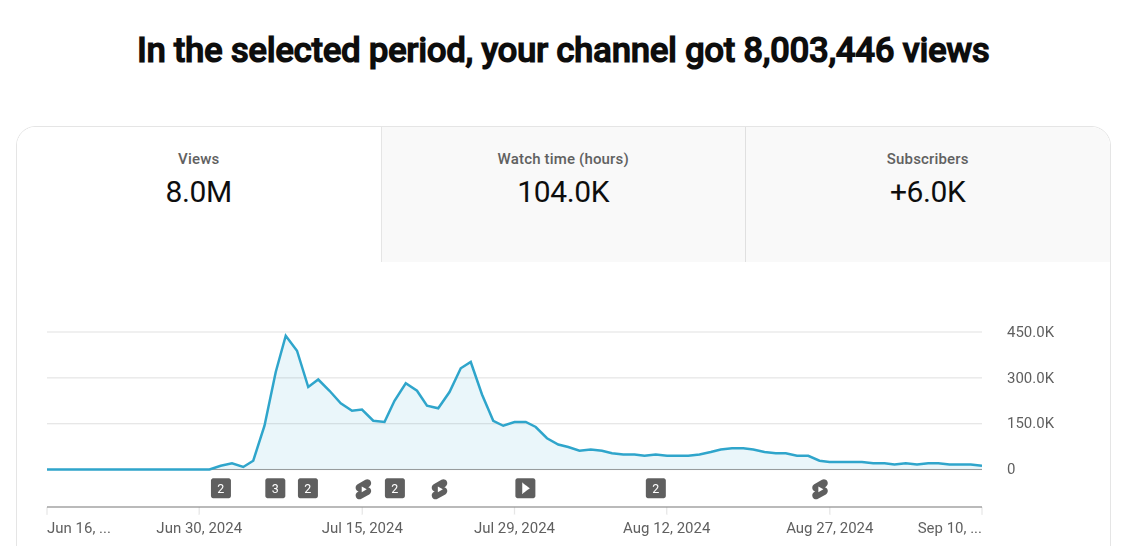
These AI voices are so natural that viewers don’t even notice it’s AI. You can get monetized and go viral with them. Popular faceless channels like Isaac and AI History Shorts use ElevenLabs and are fully monetized.
Expand to see how I tested these tools
Why trust this review?
I tested 50+ AI text-to-speech tools for real YouTube and client work over 6 months. I used them the way you’d actually use them:
- YouTube: Story videos with multi-character AI voiceovers, documentaries, countdown videos
- Freelance work: Client explainer videos, audiobook samples, documentary scripts.
I’ve created 100+ AI voiceovers across my own channels (grew one to 6K+ subs with AI voices) and freelance projects.
This is the only review that includes actual audio samples from 2026, real pricing data, and documented results. It’s the kind of detail I couldn’t find in one place when I started.
What I looked for:
- Natural breathing, pacing, emotional range without AI over-acting
- Consistent quality where every generation sounds good
- Real control to fix emphasis, adjust pauses, and control pronunciation
- Large voice library, voice cloning, and auto dubbing
Best AI Voice Generators: At a Glance
1. ElevenLabs
Best for Youtube/emotional AI voices; Cheapest to start
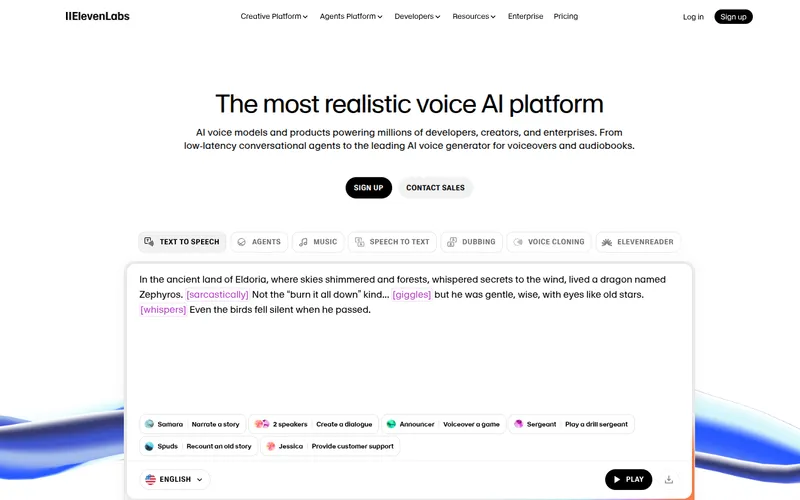
Looking for lifelike AI voices? ElevenLabs is where it’s at.
Eleven Labs Voiceover Samples
Here are my favorite ElevenLabs voices with samples you can hear right now.
1. Natasha - Valley Girl
The Natasha - Valley girl is the most popular ElevenLabs voice for social media and YouTube reels - with over 6B chars generated.
This is because it sounds very energetic and immediately grabs your attention.
Note: If you are unable to find Natasha Valley Girl voice by name, you can find it by searching using its unique ID: uxKr2vlA4hYgXZR1oPRT
More social media voices:
2. Aaron - AI and Tech News
Aaron voice is the most popular ElevenLabs voice among AI and tech YouTubers.
Cassidy is another American AI voice which works great for Podcasts.
Countdown Casey is a good voice for Top 10 and countdown style videos, like those of WatchMojo.
3. Bill L. Oxley and David - British Storyteller
For audiobooks, Bill L.Oxley and David - British Storyteller voices are highly effective for long form content. They both offer a sophisticated and engaging narrative tone.
Amelia is an excellent voice for audiobooks. She sounds a bit like Hermione from the Harry Potter series.
David Castlemore is great for YouTube channels on mystery, thriller, and storytelling niches.
4. Josh, Adam, Bella for General Narration
Josh is a remarkably adaptable voice, frequently chosen by documentary and motivational channels on YouTube for his clear and authoritative delivery.
Bella, Jordan, Bill (legacy voice), and, Adam are suited for stable and calm narration.
5. Erin - Meditation Guide
Erin is the best ElevenLabs voice for meditation videos.
Some more community voices:
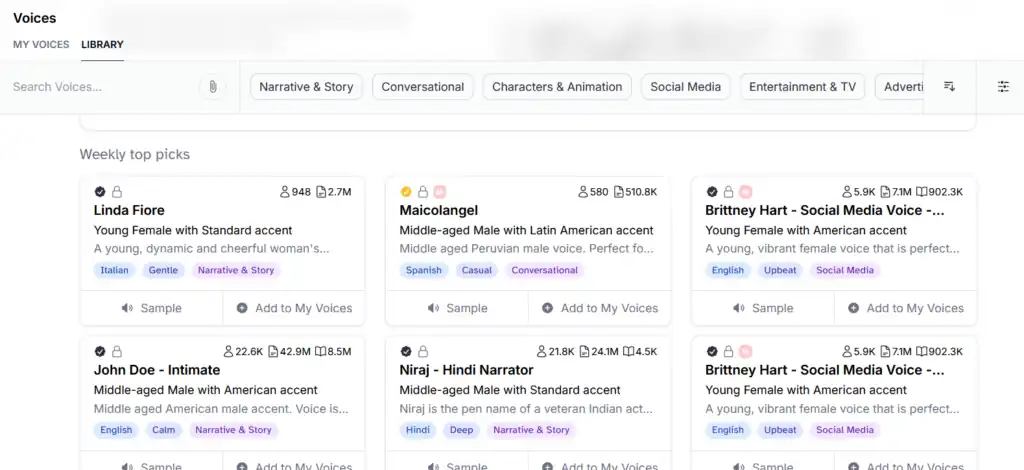
ElevenLabs also provides a wide selection of multilingual voices, including language collections of community voices.

Here’s a Hindi AI voice sample:
Most of the above voices are Professional Voice Clones (PVCs) in the ElevenLabs Voice Library, created and uploaded by real human voice artists. They sound much more natural and unique than generic AI voices, and the artists earn royalties!
ElevenLabs Actor Mode
My favorite ElevenLabs feature is Actor Mode. With it, you can use your own voice recording to guide the AI voice.
ElevenLabs will copy your tone, pacing, and emotion!
Here’s how it works:
More Features & Capabilities
You can also automatically dub any video into 29 languages.
ElevenLabs detects multiple speakers, mimics original speaker’s voice, and can import directly from YouTube.
August 2026 update: ElevenLabs now puts more of the production workflow in one place. Music v2 adds finer control over a track’s structure and arrangement, while ElevenCreative Studio 3.0 combines video, captions, narration, music, and sound effects on a timeline. I still rank it first for voice quality; these additions mainly reduce the need to move between separate editing tools.
Key Features
-
Multilingual AI voices that sound realistic and human-like.
-
Offers both text-to-speech and speech-to-speech capabilities.
-
Automatic AI dubbing in over 29 languages in the original speaker’s voice. Supports multiple speakers.
-
With the voice design feature, you can design your own AI voices of any age/gender using text prompts.
-
You can clone and remix voices.
-
Long form projects editor, AI SFX, and AI music generation are available for content creators.
-
Ultra low latency API support, Twilio integration, and voice agents SDK for software developers.
-
Scribe v2 model with enhanced multilingual support and improved algorithms
-
Flash v2.5 models with 75-150ms latency for real-time applications
-
Voice Agents Platform for low-latency conversational AI orchestration
Their long form “Projects” editor is particularly useful for businesses. Users can upload entire books, documents, or even webpages and download voiceovers for individual chapters or the whole audiobook in one go.
Pros
-
Quick Voice Cloning: Eleven Labs creates a clone that sounds just like you. No need to spend hours recording. I’ve experimented with cloning different voices and have been very impressed. Friends couldn’t tell the difference.
-
Realistic AI Voices: The AI-generated voices sound lifelike and could easily pass for human. Great for podcasts, audiobooks, and more. The voices are virtually indistinguishable from real voices.
-
Affordable entry pricing, with paid plans starting at $6 per month.
-
Free version: Elevenlabs has a free version (no commercial use license).
-
Ease of Use: The platform is user-friendly, allowing you to generate voices with a single click.
-
Scalable Plans: As your usage increases, you can opt for plans that offer up to 40 hours of generated audio per month and 660 custom voices.
-
Large voice library: 10,000+ community-shared voices, including Professional Voice Clones from voice actors.
Cons
-
Credit loss issues: This is a major complaint from users. Unused credits are lost when downgrading plans, which can be frustrating if you’ve paid for them.
-
Expensive for long-form content: High-tier plans get expensive quickly, especially for audiobook creators who need the $299/month Scale plan or higher.
-
Limited Control Over Speech: The platform offers little control over the “last mile” of speech, such as pacing, pauses, and tone inflection.
-
Professional Voice Clone verification issues: I’ve encountered problems where verification repeatedly rejects high-quality recordings. Multiple users have reported this issue.
-
Server-side errors and glitches: There are occasional generation failures and random words inserted into generated speech that aren’t in the original script.
-
Increasingly difficult to reach human support: Customer support can be slow, with some users reporting 10+ day response times and over-reliance on AI bots.
-
Advanced editor called “Projects” is only available in Creator plan and above.
User Ratings
I always sanity-check reviews before I recommend a tool. When I looked at ElevenLabs on G2, it was sitting around 4.6/5 with a couple hundred reviews, and the tone was generally positive.
When I checked Trustpilot, it was noticeably lower (around 3.1/5 at the time), and a lot of the complaints were about credit handling and slow support.
Pricing
Elevenlabs offers pricing in terms of credits. In my testing, 1 credit roughly corresponds to 1 character in English.
-
Free Plan: $0/month with ~10K credits (10 minutes TTS) for trying out the service. Perfect for getting started.
-
Starter Plan: $6 per month for 30,000 credits (about 30 minutes of speech). Includes a commercial license, Dubbing Studio, and instant voice cloning.
-
Creator Plan: $22 per month for 121,000 credits (about 121 minutes of speech). The first month is currently $11. It adds professional voice cloning and more credits for regular content production.
-
Pro: $99 per month for 600,000 credits (about 600 minutes of speech), plus higher-quality audio output through Studio and the API.
-
Scale: $299 per month for 1.8 million credits, three workspace seats, and team collaboration.
-
Business/Enterprise: Business costs $990 per month for 6 million credits and 10 seats; Enterprise uses custom pricing and terms.
These are the official ElevenLabs monthly prices and allowances I verified on August 1, 2026. Credits are shared across products, so music, dubbing, sound effects, and speech generation draw from the same pool at different rates.
Note: Credits are consumed quickly during testing and re-generations. Be careful about unused credits. They’re lost when downgrading plans.
If you’re serious about content creation, consider opting for the Creator plan or higher, as this gives you access to the “Projects Editor,” capable of creating entire audiobooks in a single go.
My Take
I’ve been using ElevenLabs for over 2 years now, and I’m pretty impressed by the range and collection of voices. When it comes to AI voice realism, ElevenLabs sets the gold standard. The voices have natural breathing, emotional depth, and variations in pacing that make them virtually indistinguishable from human voices.
What I especially love is how clearly each voice’s characteristics are explained. You can filter voices by use case, age, gender, and language to find exactly what you need.
However, the pricing model can get expensive, especially if you’re doing long-form content. The credit consumption adds up quickly during testing and editing, and the fact that unused credits disappear when you downgrade plans is a legitimate gripe. I’ve also encountered occasional glitches where generation fails or random words get inserted into the speech.
If you’re looking for a voice-over or voice cloning tool, Eleven Labs offers a lot. Its realistic voices and quick voice cloning are big pluses. But if you want detailed control over every aspect of the speech, you might want to look at tools like Murf AI instead.
For maximum voice quality and emotional range, ElevenLabs is still my #1 recommendation. Just be aware of the pricing structure and potential support delays.
Looking for free alternatives? I’ve also tested 50+ open-source TTS models and free ElevenLabs alternatives that you can run locally without monthly fees.
2. LOVO (Genny)
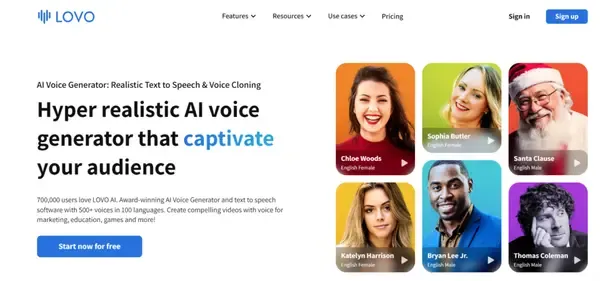
LOVO AI is an AI voice generator tool with a very large collection of voices (over 500). Their AI voice generator is called Genny.
It also includes a fully featured video editor, AI scriptwriter, a huge royalty-free media library, and instant voice cloning (requiring only 10 seconds of audio).
One useful current addition is LOVO’s Pro V2 voice model. It accepts natural-language directions in square brackets for emotion, pace, accent, and non-verbal delivery, which makes LOVO more flexible for acted lines without changing my overall ranking.
My Hands-On Experience with LOVO’s Voices
To give you a taste of what Genny can do, I used the PRO plan’s beta voices to generate the following samples:
Julian is an enthusiastic and wholesome voice. Best for YouTube videos in kids and educational niche.
May is a mature voice, with a flair for slow burn romantic and seductive scenes.
Sylvia voice is suited for audiobooks and serious scenes. It also works well as a calming AI voice.
LOVO can also be used as a goblin AI voice generator. Cunning voice is suited for voicing horror movie and story characters which sound like Goblin. You can even add creepy laughter by just typing haha.
Key Features
-
Diverse Voices: Over 500 options covering 150 languages and accents. You’re not stuck with generic voices.
-
Customization: You can tweak the speed, intonation, and pronunciation. Make the voice truly yours.
-
Emotional Range: It’s not monotone. You’ve got multiple emotional voices with over 30 tones to play with.
-
Add-Ons: You can add royalty-free background music and sound effects without leaving Lovo Studio. Super convenient.
-
AI Auto Subtitles
-
Script Help: If you’re stuck on scriptwriting, Genny AI writer can help you out.
-
Add Visual Appeal: You can also generate beautiful images with the in-built AI image generator.
-
Team editing features.
The Pros and Cons
What I Liked
-
Very easy to use with a clean and clutter free UX.
-
Best female voices out of all AI voice generators tested.
-
Good emotional range with 20 emotions in emotional voices.
-
Global voices with 150 different accents and nationalities.
-
Ability to maintain a custom pronunciation library.
-
If you re-generate speech for the same text, it doesn’t use up your credits.
-
Several built-in tools in addition to voice generator save time and money:
-
AI Writer to automatically generate scripts.
-
Video editor and Pixabay integration for stock footage.
-
AI Image generator to add custom visuals.
-
What Could Be Better
-
No download option in free plan.
-
Voice cloning only supports English.
LOVO Pricing: What’s the Best Plan for You?
-
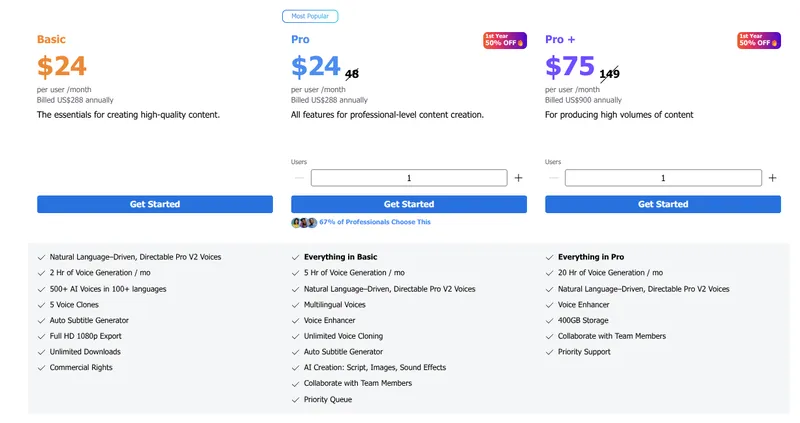
Basic Plan: Priced at USD 24/month (when paying annually) and includes 2 hours of voice generation/month.
-
Pro Plan: Costs USD 48 when paying month to month or USD 24/month (with 50% discount when billed annually) and comes with 5 hours of voice generation along with premium voices and unlimited voice cloning.
-
Pro+: Costs USD 75 per month when billed annually using the 50% discount offer. You get 20 hours of speech, team sharing, and 400GB storage.
Bottom Line
If you’re serious about creating quality audio content, whether it’s for screenplays, ads, or YouTube, LOVO is worth considering. What made it stand out for me is how much I can do in one place: write the script, generate the voice, and assemble the video with subtitles, stock media, and SFX. For my workflow, it cut down on tab-hopping.
3. MURF.ai
Best for AI Voice Localization; Best African American accents
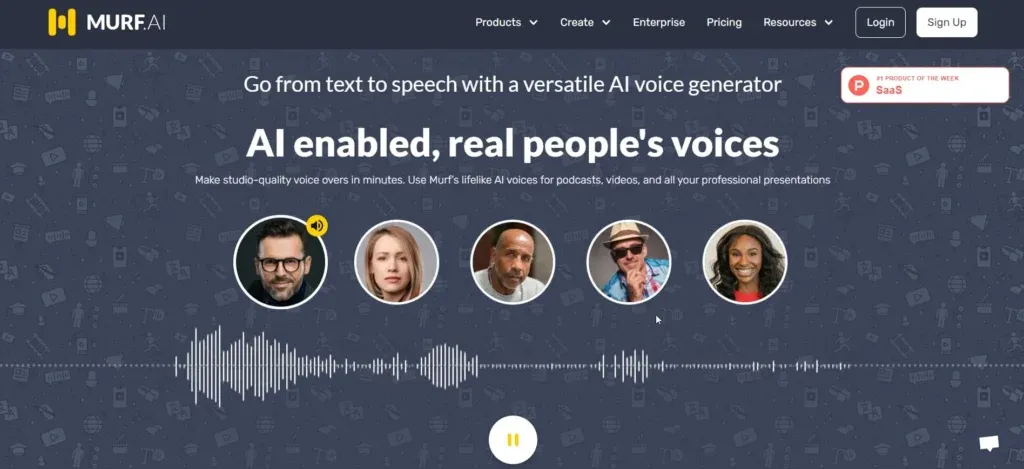
Murf.ai is a powerful AI voice generator plus video editing studio that lets you turn any text into natural and realistic speech. It has a good balance of realistic male and female voices with different English accents.
I’ve been using Murf for client work and my own YouTube projects, and I’m impressed by how well it integrates the entire voiceover production workflow. You can create voiceovers for videos, podcasts, audiobooks, presentations, and more without switching between multiple platforms. In fact, it comes with addons for Google Slides and Canva.
Based on my research, Murf holds the #3 ranking on Dev.to and is ranked #4 on Zapier for its features, which puts it in strong competition with the leaders in this space.
Murf.ai Voiceover Samples
Here’s my favorite voice Terrel suited for motivational videos, serious topics, and life-coaching podcasts. I’ve tested this voice extensively and found it adds just the right gravitas for professional content:
Brianna is a mature, calming voice. I’ve used it for podcasts on serious topics like mental health and relationships, and it strikes the perfect balance of warmth and professionalism.
Murf is great for professional videos and documentary style YouTube videos/podcasts. I’ve particularly liked how easy it makes it to add royalty-free background music directly in the studio.
Key Features
- 300+ voices across 33+ languages.
- Recent updates:
- Falcon 2: Murf’s June 2026 API model improves voice quality, latency, and generation reliability. Developers should also note that legacy Gen2 streaming is scheduled for deprecation on August 16, 2026; non-streaming Gen2 remains available.
- Speech Gen 2: Most advanced, realistic, customizable speech model with Variability, Emphasis, and “Say It My Way” features
- MultiNative: Seamlessly switch between multiple languages within a single audio file. Great for multilingual content.
- Voice Cloning 2.0: Improved precision and quality for voice cloning
- Emotion Control System: Enhanced emotional expression with better control over tone
- Voice Script AI Assistant: AI-powered script generation assistance
- Adjust pitch, speed, inflection, emotional tone, and emphasis.
- Switch voices by gender, country, and language (even within the same paragraph!)
- Specify custom pronunciations using International Phonetic Alphabet notation.
- Voice changer allows you to swap poorly recorded voices with crystal clear AI voices.
- You can also clone your own voice.
- Voice Over Video tool: Upload your video and script and Murf will generate a voiceover auto synced to your video.
- A free audio library and a Google Slides TTS extension.
- Integration with Canva allows you to add murf ai voiceovers directly in your Canva projects.
- Allows direct imports of videos from 100s of sites like YouTube/Vimeo.
Pros And Cons
What I Like:
- High-quality, natural-sounding voices that rival competitors
- User-friendly interface with integrated studio capabilities
- Extensive customization options for pitch, speed, emotions, and emphasis
- Strong team collaboration features (better than most competitors)
- MultiNative capability (switch languages within a single audio file)
- Good integrations (Canva, Google Slides, video editing workflow)
- Voice Cloning 2.0 with improved precision
- Commercial rights included
- Regular feature updates and improvements
- Responsive customer support
What Could Be Better:
- Free tier limitations: Only 10 minutes of voice generation, which I found quite restrictive for testing
- Higher cost for premium features compared to some alternatives
- Only a subset of voices sound truly good; many others can sound robotic
- Voices on paid plans sound much better than free tier voices
- Content restrictions (Murf blocks curse words and certain content)
- Some voices lack emotional depth compared to real human voices
- Time investment required to achieve ideal voiceover quality
- Voice quality can be inconsistent across different voices
User Ratings and Community Feedback
G2: When I checked, Murf was around 4.7/5 with 1,300+ reviews. A lot of people called out the voice quality and the studio workflow.
Trustpilot: Murf was in the mid-4s when I checked. Most of what I saw was praise for ease of use and audio quality.
Reddit: I skimmed a bunch of Reddit threads while researching, and Murf comes up a lot for:
- Professional content creation
- Marketing materials
- Training videos
- E-learning content
Murf Pricing
- Free: Offers 10 minutes of voice generation and 10 minutes of transcription. I liked the fact that it did not require a credit card to sign up for the free plan.
- Creator: $19 per user/month (billed annually): 100 projects, 2 hours voice generation
- Business: $66 per user/month (billed annually): More voice generation time + advanced features
- Enterprise: Custom pricing with full feature access, dedicated support
Each plan comes with a Lite and Plus variant. Choose Plus for even higher voice generation limits.
Going for annual billing saves you 33%. Consider monthly billing if your project is short-term.
Educators, Students, and Non-Profits can get special discounts with Murf.ai. First, sign up for the free trial with your official email ID and then follow the steps here to put in a request.
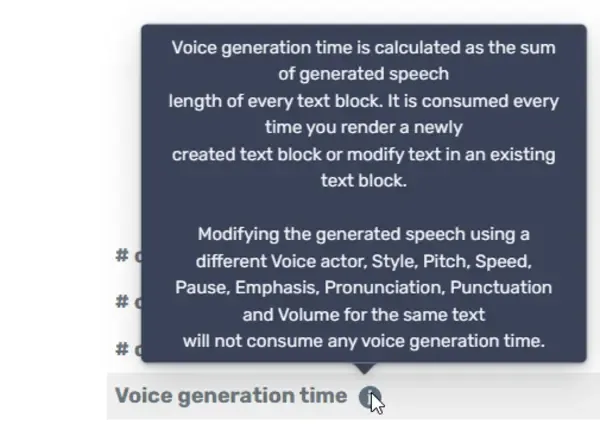
The good thing about their voice generation limit is that playing around with different voices for the same generated text does not consume it.
My Take
I’ve tested Murf extensively and found it to be one of the best AI voice generators for creators and businesses who want high quality AI voices with a lot of customization options at a reasonable price-point.
What I appreciate most is the integrated studio approach. Instead of just generating voiceovers, you get a full production suite with timeline editing, music/SFX, and team collaboration. This saved me significant time when creating content for clients.
It handles accents really well, the interface is easy to use, and the learning curve is small. I particularly liked testing the MultiNative feature, which lets you switch languages mid-sentence. It’s a unique capability that’s great for global content.
Murf is trusted by 300+ Forbes companies and integrates well with Google presentations and easily syncs voiceovers with imported videos. While ElevenLabs might have slightly better pure voice quality, Murf’s integrated workflow and collaboration features make it my top pick for business teams and content creators who need more than just voice generation.
4. Speechify
Best for Students/Productivity/ADHD - #3 in Zapier, #4 in Dev.to
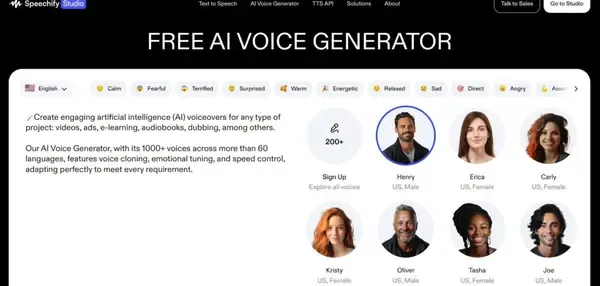
Speechify is a text-to-speech (TTS) platform I’ve been using extensively since 2017 when I first discovered it. What sets Speechify apart is its focus on productivity and accessibility. When you install the Chrome extension for free, you can convert web articles into speech by simply selecting your preferred voice. I’ve been using it to convert my Medium blogs and research papers into audio, which has dramatically increased how much content I can consume while commuting or doing other tasks.
My Testing Experience
I tested Speechify across multiple platforms: the Chrome extension, iOS app, Mac app, and web interface over the last several months. The reading experience is calm, well-paced, with a good balance between variation and consistency. Unlike some competitors that sound overly energetic, Speechify’s voices feel more like a trusted narrator reading to you.
The standout feature I ended up using most is the Voice Typing Dictation capability. By pressing Option + Z on Mac, I could speak naturally and Speechify would polish my writing in real-time, removing filler words and improving clarity. I tested this for writing blog posts and found it made me much more productive than traditional typing.
The AI Recap feature has been useful when I need to quickly review articles I’ve already read. Instead of re-listening to entire content, I get an automatic summary that covers the key points. I’ve been using this to refresh my memory on research materials before meetings.
Celebrity Voice Clones vs Studio
One of Speechify’s unique selling points is its celebrity AI voices - Gwyneth Paltrow, MrBeast, Ali Abdaal, Snoop Dogg are all available. I’ve used the MrBeast voice for creating engaging sample content and found it captures his energetic style remarkably well.
However, there’s an important distinction I discovered: these celebrity voices are available on the main platform but NOT in Speechify Studio. If you’re primarily interested in celebrity voice cloning, stick to the main platform. The Studio is better suited for professional voiceover work with more control over production elements.
Recent Updates
Speechify has added a lot of useful features recently:
-
SIMBA Voice Model: I noticed the SIMBA model improves naturalness significantly. The voices have better emotional controls - cheerful, sad, angry, fearful - though the quality varies by which voice you select. The updated Snoop Dogg voice sounded noticeably more expressive when I tried it.
-
Voice Typing Dictation: Allows you to type faster by speaking. The AI removes filler words and improves sentence structure. I tested it extensively and found it most useful for blog writing and email drafting.
-
AI Recap: Provides automatic summaries of content you’ve already read. Perfect for quick reviews of research materials or refreshing memory before meetings.
-
Voice AI Assistant integration: You can now talk to Speechify about a website, book, or document. The AI assistant answers questions and helps navigate longer content.
Pros
- Natural reading cadence: Speechify focuses on rhythm, word spacing, and speed - calm and well-paced
- Cross-platform sync: Seamless reading position across iOS, Android, Mac, PC, and web
- Celebrity voice clones: Gwyneth Paltrow, Snoop Dogg, MrBeast, Ali Abdaal available
- Excellent customer service: I’ve found their support team consistently responsive and helpful
- 1,000+ voices in 60+ languages: Massive voice library with regional accents
- Multi-platform integration: Chrome extension, iOS, Android, Mac, PC, web
- Reads PDFs, emails, documents, posts from: LinkedIn, Reddit, Gmail, Notion, Kindle
- AI features: Voice Typing Dictation (5x faster), AI Summaries & Chats, AI Podcasts
- Accessibility-focused: Designed for dyslexia, ADHD, low vision
- SIMBA Voice Model: Enhanced quality with emotional controls
- Scanning capability: Converts physical documents and images to text
Cons
- Monthly word limits: Free plan users hit limits within 2 weeks, downgraded to robotic voices - frustrating for heavy users
- Speed claims inflated: Advertised high speed but maximum usable speed is lower before comprehension drops
- Billing transparency issues: Trial cancellation and unexpected charge complaints from users
- Voice quality varies: Premium voices are natural-sounding but free voices sound robotic and monotone
- Famous voices NOT in Studio: Celebrity clones available on main platform only
- Application bugs: File upload issues, PDF rendering problems, browser extension incompatibility
- Cross-sync occasionally fails: Reading position sometimes desyncs across devices
- Terms of service concerns: Users grant irrevocable, perpetual license to uploaded content
- Emotion quality varies: Depends on which voice you select
User Ratings
I checked a few places before writing this. Trustpilot was around 4.6/5 with thousands of reviews, and a lot of the comments focused on customer service and the overall listening experience. On iOS, the App Store rating was around 4.7/5 with a huge number of ratings. G2 was around 4.4/5, but with a much smaller sample size.
Reddit Feedback
From Reddit discussions, users generally share positive experiences:
- “Voices sound human-like and natural, very good for audiobooks and YouTube” - common sentiment
- “Great listening experience, keeps you engaged”
- “Cross-device sync is seamless” - multiple users praised this
- Monthly word limits and billing concerns mentioned by free tier users
- Customer service “actually responsive for this kind of AI company”
Pricing
Free Plan: $0/year
- Best for: Testing basic TTS features
- Includes: 10 robotic voices, 1.5x speed, text-to-speech only
- Limit: Users typically hit monthly word limits within 2 weeks
Premium: $29/month or $139/year (60% savings)
- Best for: Students and professionals needing productivity features
- Includes: 1,000+ voices, high-speed listening, AI features
- Features: Voice Typing Dictation, AI Summaries & Chats, AI Podcasts, Voice AI Assistant
- Integrations: Google Drive, Dropbox, Microsoft OneDrive, Chrome extension
- Languages: 60+ different languages and accents
- Usage: 1,000,000 words per month guaranteed
Studio Starter: $19/month
- Best for: Commercial voiceover work
- Includes: 7,200 Studio credits, 1,000+ realistic voices, voice cloning
- Features: Commercial usage rights, stock media library
Studio Creator: $49/month
- Includes: 28,800 Studio credits, everything in Studio Starter
Best For
Speechify is ideal for:
- Students: Converting textbooks, research papers, lectures to audio
- Professionals: Processing emails, reports, client documents while commuting
- People with reading challenges: Dyslexia, ADHD, low vision, concussions
- Content creators: Generating sample voiceovers and podcasts
- Multitaskers: “Reading” articles, emails, documents while walking, driving, or exercising
The cross-device sync means you can start reading on your desktop and continue on your phone without losing your place. I’ve used the iOS app extensively during my commute and the reading position syncs perfectly with my desktop.
Speechify’s focus on accessibility and productivity, combined with its extensive voice library and recent feature updates, makes it my top recommendation for anyone who prefers listening over reading or needs assistive technology for reading disabilities.
5. WellSaid Labs
Best for word-by-word precision control; High authenticity for enterprise use
Ranked #2 in Dev.to’s comprehensive comparison and #4 in Zapier’s analysis, WellSaid Labs has earned its place among top AI voice generators for one standout reason: authenticity.
When I tested WellSaid Labs, I was impressed by how natural their voices sound. The 120+ voices across multiple languages feel human-like, which many competitors struggle to achieve. This authentic quality is the primary reason it ranks highly in professional comparisons.
I’ve liked their voices a lot - they feel authentic and realistic, especially for professional content where credibility matters.
What Sets WellSaid Labs Apart
Word-by-Word Phonetic Control
This is where WellSaid Labs stands out. While most tools give you general controls over speed and pitch, WellSaid gives you granular word-by-word precision.
The Cues panel shows your text as outlined words. Clicking any word reveals controls where you can adjust:
- Pace (color-coded in green)
- Loudness (color-coded in blue)
- Pauses (color-coded in purple)
I found this invaluable for fine-tuning narration. Want to emphasize “breakthrough” in a documentary? Just click it and boost the loudness slightly, then add a 250ms pause after it to let it sink in.
This level of control is something ElevenLabs simply doesn’t offer. While ElevenLabs excels at overall performance, WellSaid gives you the tools to craft exactly the pronunciation and emphasis you want.
Adobe Integration
If you’re an Adobe user, this is a major advantage. WellSaid Labs has native integrations with:
- Adobe Premiere Pro
- Adobe Express
- Canva
I tested the Premiere Pro integration and found it seamless. Generate voiceovers directly in your editing timeline without leaving your workflow. For video creators, this integration alone could be worth the investment.
My Hands-On Experience
When I first started with WellSaid Labs, I won’t sugarcoat it - there’s a learning curve.
The word-by-word controls are powerful, but it takes experimentation to use them well. I found myself making drastic changes early on that actually reduced the overall realism. The key is subtle adjustments - small tweaks that enhance without sounding artificial.
Here’s what I learned:
- Keep pace variations under 10-15%
- Don’t push loudness beyond ±15dB from baseline
- Use pauses between 100-300ms for natural speech flow
Once I got the hang of it, I was creating voiceovers with a level of precision I can’t achieve with ElevenLabs. For instructional content where timing and emphasis matter, this control is useful.
Key Features
- 120+ authentic voices in multiple languages described as “authentic and realistic”
- Word-by-word phonetic controls for precise sound and timing adjustments
- Color-coded editing system: green (pace), blue (loudness), purple (pauses)
- Pronunciation controls for how words sound regardless of spelling
- Voice cloning capability
- API integration for developers
- Adobe integrations: Native support for Premiere Pro, Adobe Express, and Canva
- Enterprise compliance: SOC 2 and GDPR certified
- 1-week full access free trial with all features available
Pros and Cons
What I Loved:
- Voice authenticity: The voices sound human and natural, not robotic
- Precision control: Word-by-word editing lets you craft exactly the pronunciation and emphasis you want
- Adobe integrations: Seamless workflow if you’re a Premiere Pro or Express user
- Enterprise-ready: SOC 2 and GDPR compliance make it suitable for regulated industries
- Comprehensive trial: 1-week full access lets you test everything before you buy
- Voice cloning: Create custom voices that match your brand or personal voice
What Could Be Better:
- Learning curve: There’s definitely experimentation required to get the best results
- Emotional performance limitations: The tool has limited emotional control - it’s not suited for dramatic acting
- No long-term free option: Unlike some competitors, there’s no permanent free tier
- Pricing: At $50/user/month for the Creative plan, it’s pricier than options like ElevenLabs ($6/mo starter)
- Pace your changes: Drastic adjustments can reduce authenticity - subtlety is key
Pricing
Free Trial: 1 week full access to Studio + API trial with all features
Creative Plan: $50/user/month
- 60 downloads per month
- All English voices
- Word-by-word controls
- Adobe integrations API plans available with custom pricing for developers
When to Choose WellSaid Labs vs. ElevenLabs
Choose WellSaid Labs if you:
- Need word-by-word precision control for specific pronunciation and emphasis
- Work primarily in Adobe Premiere Pro or Express
- Enterprise compliance (SOC 2, GDPR) is a requirement
- Want the most realistic voices for professional content
- Willing to invest time learning the interface for better control
Choose ElevenLabs if you:
- Want the best overall voice quality and emotional range
- Prefer a simpler, more intuitive interface
- Are budget-conscious (starts at $6/mo)
- Need extensive multilingual capabilities (29+ languages)
- Want a large community voice library (10,000+ voices)
My Take
WellSaid Labs fills an important niche for creators who need granular control over their voiceovers. If you’re producing instructional content, e-learning modules, or any content where precise pronunciation and emphasis matter, the word-by-word controls are valuable.
For Adobe users, the native integrations make this an obvious choice. For general content creators who want great voices without the learning curve, ElevenLabs might be the better option.
The learning curve is real, but once you master the word-by-word editing, you’ll have capabilities that competitors don’t offer. If precision matters more than ease of use, WellSaid Labs is worth the investment.
User Ratings & Feedback
G2/Trustpilot: Not available in research sources
Reddit Feedback: Limited direct feedback available. Users generally appreciate the voice realism but note the learning curve required to maximize the tool’s potential.
“I liked their voices a lot - they feel authentic and realistic. There’s a learning curve and experimentation process, but the results are worth it.”
6. Hume
Best for Emotional Voice Intelligence & Voice Design from Prompts
Hume is a unique AI voice generator I’ve tested, ranking #2 in Zapier’s comprehensive review. What sets Hume apart is its Emotional Voice Intelligence (EVI) system - it’s designed specifically for emotionally-aware voice generation, which I haven’t seen elsewhere.
When I visited Hume’s website, I discovered a different approach to voice generation. Instead of selecting from pre-made voices, you can design voices from scratch using text prompts. I was impressed by this capability - it’s like describing the voice you want in your head and having it materialize.
In practice, I type a short prompt describing the voice I want (age, vibe, energy), then iterate a few times until the tone matches what I’m going for.
Key Features
Hume’s unique features focus on emotional intelligence and expressive voice control:
- Emotional Voice Intelligence (EVI): Real-time emotionally-aware conversation support that detects and responds to emotional cues
- Voice Design from Prompts: Create completely custom voices using natural language descriptions
- Auto-generate Button: Get started with AI-suggested voice prompts for quick experimentation
- Accent Settings: Shift from British to Nashville twang, altering rhythm and musicality
- Emotional Intelligence System: Control emotions on a 0-1 scale for Determination, Joy, and Excitement
- Facial Analysis: Detect mood from camera input to influence voice generation
- Zero-Data Retention: Privacy-first approach with no data storage after generation
What I Liked
The emotional range of Hume’s voices is notable. The AI produces performances with emotional nuance, which many other voice generators struggle with. The voice design from prompts feature is experimental; I found it accurate in translating descriptions into voice characteristics.
I appreciated the accent settings. Shifting from a British accent to a Nashville twang changes pronunciation, rhythm, and musicality. It’s a level of detail few tools offer.
The emotional intelligence system is powerful. I can dial in specific emotions like Determination, Joy, and Excitement on a scale of 0-1, giving me control over the emotional tone of generated speech.
What Could Be Better
Hume has a learning curve and unpredictable results. I discovered that getting consistently good outputs takes time and experimentation. As I gained experience, I found it could yield more nuanced performances, but it’s not as straightforward as some competitors.
The language support is limited - only English and Spanish currently. This makes Hume less useful for most multilingual projects compared to tools like ElevenLabs, whose v3 model supports 70+ languages.
Pricing
- Free: ~10 minutes of text-to-speech per month for experimentation
- Starter: $3/month - ~30 minutes of text-to-speech, 20 projects
- Higher tiers: Available for more extensive use cases
Best For
I recommend Hume for:
- Experimental Voice Creation: Designing unique voice profiles from text descriptions
- Emotionally-Aware Conversations: Building AI agents that understand and respond to emotional cues
- Creative Projects: When emotional expression matters more than straightforward realism
- Research: Experimenting with emotion-aware AI voice generation
My Take
Hume is experimental and reasonably accurate at what it does. It’s niche but offers unique capabilities. If you’re focused on emotional voice intelligence and designing voices from prompts, Hume is worth exploring - just be prepared for a learning curve and accept that results won’t always be predictable.
However, for most standard voiceover needs like YouTube narration, audiobooks, or straightforward content creation, I’d recommend sticking with more established tools like ElevenLabs which offer consistent realism and broader language support.
Honorable Mentions
I tested these tools and while they didn’t make my top 5, each has a specific niche that might work for you.
Typecast excels at creating animated AI avatars with character voices. I found it perfect if you need virtual characters with voiceovers in one platform.
Voicemaker is a solid budget-friendly web-based TTS with SSML support and two AI engines. I recommend it if you need basic text-to-speech without the bells and whistles.
Listnr simplifies podcast creation with video dubbing and an intuitive studio. Use it if you want to turn blog posts into audio or create podcasts quickly.
Resemble.ai specializes in voice cloning with 3-minute voice replication. Consider it if cloning is your priority and don’t mind per-second pricing.
Synthesys combines AI avatars with text-to-speech and lets you customize outfits. I suggest this for camera-shy creators who want AI humans in their videos.
Voicera is designed specifically for audio blogs and improving SEO. Use it if you want to add voiceovers to articles and make content more accessible.
Uberduck offers 5,000+ voices including celebrity clones and AI-generated raps. It’s fun for novelty content, but not for serious voiceover work.
PlayHT used to be a common pick in this space, but I no longer consider it usable.
AI Voice Generators: At a Glance
Here’s a quick comparison of the top 5 AI voice generators I recommend most.
| Tool | Voice Quality | Key Features | G2 Rating | Starting Price | Best For |
|---|---|---|---|---|---|
| ElevenLabs | Most realistic, industry leader | 10,000+ voice library, Voice Design, dubbing in 29 languages, Voice Agents Platform | 4.6/5 (219 reviews) | $6/mo (Starter) | Overall best; YouTube/audiobooks |
| Murf AI | High-quality, premium voices excel | MultiNative language switching, studio workflow, team collaboration, emphasis control | 4.7/5 (1,378+ reviews) | $19/mo (Creator) | Audiobooks, corporate teams |
| Speechify | Excellent human-like cadence | Celebrity voice clones (MrBeast, Snoop Dogg), cross-platform sync, Voice Typing Dictation | 4.4/5 (35 reviews) | $29/mo or $139/year | Students, productivity |
| WellSaid Labs | Authentic and realistic | Adobe Premiere/Express integration, word-by-word controls, SOC 2/GDPR compliant | N/A | $50/user/month (Creative) | Enterprise, Adobe workflows |
| Hume | Experimental emotional intelligence | Emotionally-aware conversations, zero-data retention, voice design from text | N/A | $3/mo (Starter) | Emotional expression, innovation |
My Quick Picks
Need specific recommendations? Here’s what I suggest for different use cases:
Best for Audiobooks
I recommend Murf AI for audiobooks because it’s consistently ranked #1 by Reddit users and trusted by 300+ Forbes companies. Its MultiNative feature lets you switch between multiple languages within a single audio file, and the studio workflow includes integrated timeline editing, music, and SFX. It’s a great fit for long-form audiobook production.
Best for YouTube
I recommend ElevenLabs for YouTube because it has a large community voice library (10,000+ voices) and the most comprehensive feature set. Whether you’re doing narrative voiceovers, character voices, or story narration, ElevenLabs delivers the variety and realism that keeps viewers engaged - and they won’t notice it’s AI.
Best for Podcasts
I recommend Speechify for podcasts because it excels at human-like cadence (rhythm, word spacing, pacing) that keeps listeners engaged without feeling robotic. The cross-platform sync means you can work on your podcast across any device, and celebrity voice clones like Snoop Dogg and MrBeast add a fun, recognizable element to your content.
Best for Enterprise
I recommend WellSaid Labs for enterprise because it’s SOC 2 and GDPR compliant, which is essential for regulated environments. The native Adobe Premiere Pro and Express integrations make it seamless for video production teams, and the word-by-word precision controls ensure consistent, professional quality across all your branded content.
Best for Emotional Expression
I recommend Hume for emotional expression because it’s the only tool with real-time emotionally-aware conversation support. The EVI technology lets you control emotion on a 0-1 scale (Determination, Joy, Excitement), and you can design voices from scratch using text prompts. It’s experimental but useful if you need nuanced, emotionally intelligent voice generation.
Expanded FAQ
Here are the questions I get most often.
What is the most realistic AI voice generator?
ElevenLabs continues to be the industry leader for realistic voices - I’ve used it extensively and consistently get results that people mistake for real voice actors. Murf AI and Speechify are excellent backup options with strong voice quality, especially for specific use cases like corporate training or accessibility needs.
Are AI voice generators free?
Most follow a freemium model. You can test basic features for free (typically 5-15 minutes of voice generation), but commercial use requires a paid plan. I found ElevenLabs offers ~10K free characters monthly, while Speechify and TTSMaker provide generous free tiers for non-commercial testing.
Can I use AI voices for YouTube monetization?
Yes, as long as you have proper commercial licensing from the tool. I’ve grown channels to 6K+ subs using AI voices, and YouTube allows monetized content with AI voiceovers. Just ensure you’re not cloning voices without permission and that your content provides original value beyond the voice itself.
How do AI voice generators work?
Modern tools use neural TTS (text-to-speech) with deep learning models trained on extensive voice datasets to generate speech that mimics human patterns, breathing, and emotional nuances. I’ve noticed the most advanced models like ElevenLabs’ v3 and Murf’s Gen2 can even interpret emotional directives from text prompts.
What should I look for when choosing?
I’ve learned to prioritize: voice realism for your specific use case, emotional range capabilities, commercial licensing terms, credit/pricing model (usage-based vs subscription), and integration needs. For YouTube content creators, I also value easy voice cloning and multi-language dubbing support.
Can AI voices clone real people?
Technically, yes. Most premium tools let you clone a voice with just 10-30 seconds of audio. I strongly advise ONLY cloning voices you own or have explicit permission to use. Cloning strangers may have legal consequences in many jurisdictions.
Do AI voices sound robotic?
Not with the right tools. I’ve found premium voices from ElevenLabs, Speechify, and Murf AI sound virtually indistinguishable from human recordings. The gap has narrowed significantly with newer models like Scribe v2, SIMBA, and Murf’s Gen2, though free-tier voices can still sound mechanical.
What is voice cloning?
Voice cloning creates a digital replica of a human voice from audio samples. Tools like ElevenLabs and Murf AI can do this in as little as 10 seconds. I’ve cloned my own voice for consistent branding across projects, saving hours of recording time while maintaining authenticity.
How do I improve AI voice quality?
I’ve found the best results come from using emotional direction tags (like “dramatic tone” or “sad”), using proper punctuation for pauses, and using CAPS for emphasis. Also, re-generating the same text often yields slightly different variations. Sometimes the third attempt sounds perfect.
Which tool offers the best value for money?
For most users, I recommend ElevenLabs ($6/month Starter) for quality, Speechify ($139/year) for reading productivity, and TTSMaker (free tier with commercial use) for budget needs. I’ve learned that credits often go further than time-based limits, so compare models carefully.
Are AI voices legally safe to use?
Generally yes, if you have proper licensing and aren’t violating rights. Voice cloning laws vary by jurisdiction. I always verify commercial terms explicitly; some free tiers restrict commercial use, and cloning without permission raises legal questions.
Can AI voices handle multiple languages?
Many tools now offer multilingual cloning and dubbing. ElevenLabs supports 29 languages and can detect multiple speakers in one file. I’ve used this to automatically dub content for global audiences, though regional accents sometimes require manual fine-tuning.
What’s the difference between subscription and credit pricing?
Credits (ElevenLabs) give you character-based limits you use as needed, while subscriptions (Speechify, Murf) provide monthly time quotas. I prefer credits for variable workloads and subscriptions for consistent production needs - unused credits are usually lost monthly.
Video Review
Watch Nav review our top 5 AI voice generators in video format!
Wrap Up
That’s the list I keep coming back to. In this article, I shared the AI voice generators and text-to-speech tools I’ve had the best results with, along with key features, pros, and cons.
When deciding on the best AI voice generator for your business, take into account what you’re trying to achieve with it and which features will best align with your requirements.
AI-powered tools can help you improve workflows and grow your business. Text-to-speech and voice generation is one application. AI can also be used to write stories, create courses, and help you develop intelligent apps.
I hope you found the AI tools in this article useful. Thanks for reading.