






![Forest vs Flora: Which Focus App Is Better? [2026]](/_astro/forest-vs-flora-1.BewYnPyX_Z1OMOKu.png)
My verdict: After testing Forest and Flora for six months, I recommend Flora for most students and solo users. Its focus timer, to-do list, repeating goals, habit tracker, and group sessions are free, so it gives you more ways to organize the work around each focus block without another subscription.
I would choose Forest if your main problem is distraction rather than planning. Its free tier now includes Deep Focus app blocking, scheduled Time Guard blocks, group sessions, ambient sound, and a visual forest. It also has broader device support and can sync your history across mobile devices and browser extensions.
In 2026, both are free to start, both run on iPhone and Android, and both offer a Chrome extension. The real decision is whether you value Flora’s task-and-habit layer or Forest’s stronger blocking and cross-device experience.
Forest vs Flora at a Glance
| Feature | Forest | Flora |
|---|---|---|
| My pick for | Blocking distractions across devices | Free focus, tasks, habits, and study groups |
| Platforms | iPhone, iPad, Android, Apple Watch, Chrome, Firefox | iPhone, Android, Chrome |
| Starting price | Free | Free |
| Paid extras | Plus subscription for analytics, custom tags and allowlists, full soundscapes, and premium trees | Optional paid tours plus opt-in Price and Care services |
| App and website blocking | Deep Focus and Time Guard are free; custom allowlists and multi-app Time Guard require Plus | Focus blocking; custom app allowlist on compatible iPhones |
| Tasks and habits | Focus tags and analytics on Plus; no full to-do system | To-dos, reminders, repeating goals, habits, and statistics |
| Group focus | Yes; one person quitting ends the group’s tree | Yes; a host quitting ends the room, while a guest only loses their own tree |
| Ambient sound | Yes | No |
| Real-tree program | Plus and grandfathered Pro users can redeem coins, normally up to five trees per account | Optional Price and Care services fund real trees |
Both apps use the same basic motivational loop: start a focus session, let a virtual plant grow while you work, and risk losing it if you open a distracting app. That small consequence makes checking your phone feel less automatic.
The apps are often described as Pomodoro timers, but neither forces you into one rigid 25-minute routine. They work just as well for a shorter study sprint, a longer deep-work block, or phone-free time with family.
Flora Review: Best Free All-in-One Pick
Flora combines a focus timer with lightweight planning. You can attach a session to a to-do, turn that task into a repeating goal, and see how your focused time contributes to a habit. That makes Flora the more useful choice if you want the app to answer both “What should I work on?” and “Can I stay off my phone while I do it?”
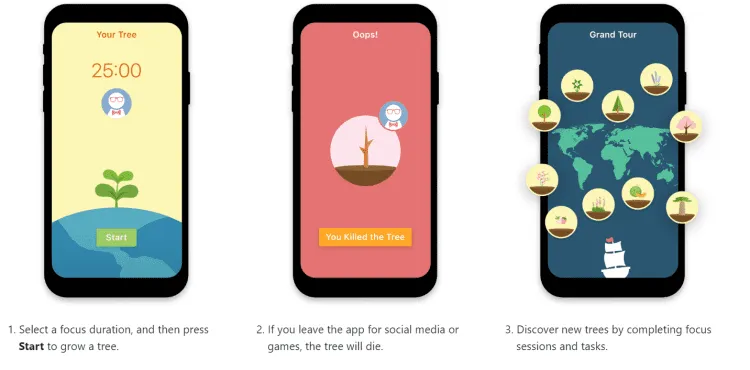
Flora grows a virtual tree while you focus and withers it if you quit.
Flora’s Best Features
Focus Trees and Grand Tour
Choose a focus duration and a plant, then start working. If you finish, the plant joins your garden. Completing sessions and tasks also unlocks more plants across Flora’s location-based Grand Tour.
Flora can run a solo focus session offline. You will not be able to use online features such as group rooms or report an incorrectly killed tree until you reconnect, but the core timer still works.
The pause control is useful when you genuinely need another app. You can disable pauses when you want stricter accountability. On iOS 16.1 or later, Flora also supports an app allowlist, so a dictionary, calculator, or other work tool does not have to kill the session. These controls are covered in Flora’s current focus-tree documentation.
To-Dos, Goals, and Habit Tracking
Flora’s planning features are its clearest advantage over Forest. A to-do can include a reminder, a focus-time goal, or a repeating daily, weekly, or monthly target. When you start from a task, Flora attributes that focus time to the relevant list and color.
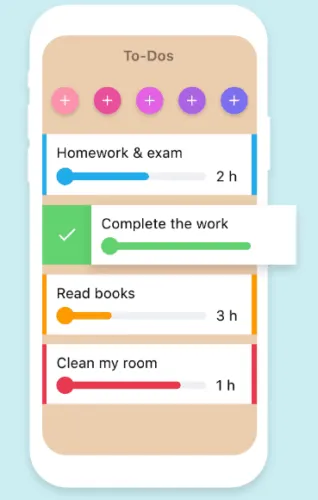
Flora connects focus sessions to tasks and repeating goals.
Enable Habit Tracker on a repeating task and Flora turns completed focus sessions into a streak. Daily, weekly, monthly, and yearly statistics then show where your focus time went.
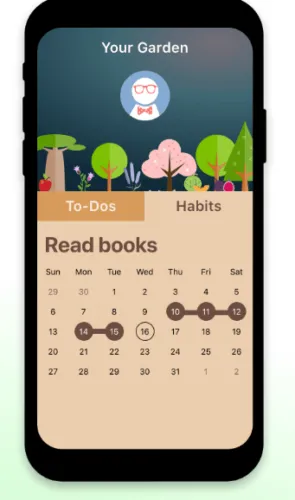
Flora uses completed focus sessions to build habit streaks.
One important limitation: Flora keeps most account data in the cloud, but its FAQ says focus statistics are still stored locally. Reinstalling the app can therefore erase your stats even though your tours, garden, to-dos, and stories remain.
Group Focus
Flora is especially good for study partners. You can share a room code, invite friends, and grow at the same time. If the host quits, the session ends and everyone loses the tree. If a guest quits, only that person’s tree dies.
That setup creates stronger social accountability than a solo timer, but it can also feel punitive. I would use it with friends who find a shared commitment motivating, not with anyone who will turn a lost virtual tree into unnecessary stress.
Flora Pricing
Flora has one free version rather than a separate premium tier. The free app includes its focus, task, habit, and group features, and the Google Play listing says it does not show ads.
There are still optional purchases. The US App Store listing shows additional tours at $0.99 or $1.99. Flora also offers two optional ways to support real-tree planting:
- Flora Price: Pledge money before a session and confirm the charge if you break the commitment.
- Flora Care: Connect successful focus time to real-tree planting.
Neither service is required to use Flora’s productivity features.
Flora Pros and Cons
Pros
- Free focus timer, to-dos, goals, habit tracking, and group sessions.
- No ads in the Android app.
- Strong selection of virtual plants and progression through Grand Tour locations.
- Useful pause and allowlist controls for work that still requires a phone.
- Available on iPhone, Android, and Chrome.
Cons
- Focus statistics are not backed up to Flora’s servers.
- No built-in ambient-sound library comparable to Forest’s.
- Group accountability can feel too punishing for some people.
- The current iPhone app requires iOS 16.4 or later.
Forest Review: Best for Blocking and Multiple Devices
Forest is the better specialist. It does not try to replace your task manager. Instead, it combines a countdown or stopwatch, app blocking, scheduled distraction controls, focus tracking, ambient sound, and a forest that records completed sessions.
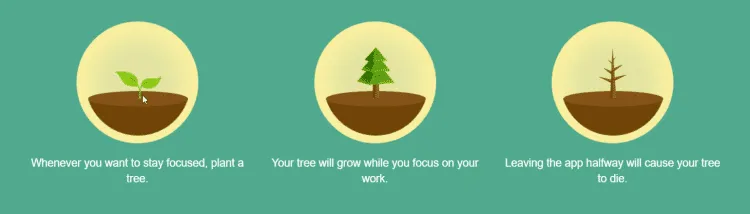
Forest turns each completed focus session into part of a virtual forest.
Forest’s Best Features
Deep Focus and Time Guard
Forest’s Deep Focus mode blocks selected distractions during an active session. Time Guard extends that idea beyond the timer by scheduling recurring windows when apps or websites should stay blocked.
Both tools are included in Forest Free. The free version limits Time Guard to one app or site, while Forest Plus adds custom app allowlists and multiple Time Guard targets. That is a meaningful distinction if your work requires Slack, a calculator, reference sites, or another tool during a session.
Cross-Device Support
Forest runs on iPhone, iPad, Android, Apple Watch, Chrome, and Firefox. Your account, focus history, and forest can sync across supported platforms, so it is the better fit if distractions follow you from your phone to your browser.
Core timers, tree growth, and local statistics work offline. Group focus, challenges, the shop, seasonal events, and real-tree redemptions need an internet connection.
Focus Tracking, Sounds, and Social Features
Forest Free tracks your sessions and grows the visual forest. It also includes one Mindful Space soundscape, ambient focus sounds, Focus Challenge, Plant Together rooms, friends, and leaderboards.
Plus adds detailed focus analytics, custom tags, saved focus presets, the full Mindful Space collection, premium and early-access trees, and extra seasonal rewards. If you only need a timer that blocks distractions, the free tier is enough. If you want to analyze time by project or customize what remains available during a block, Plus becomes much more relevant.
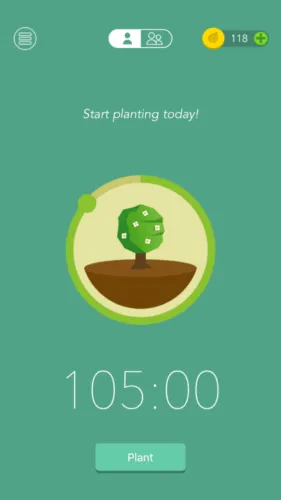
Forest keeps the active timer simple while the tree grows.
Forest Pricing
Forest now has a free tier on both iOS and Android. The old one-time Forest Pro purchase is discontinued for new users, although existing Pro owners keep their original features permanently.
Forest Plus is a subscription with a free trial. Pricing varies by country and app store. As of August 2026, the US App Store lists early-bird options at $5.99 monthly and $32.49 to $35.99 annually. Check the price shown inside your app before subscribing.
The free tier has occasional ads, but Forest says they do not appear during active focus sessions. Plus removes the ads.
Forest Pros and Cons
Pros
- Useful free timer, Deep Focus blocking, scheduled Time Guard, group rooms, and ambient sound.
- Broad support across phones, tablets, Apple Watch, Chrome, and Firefox.
- Syncs focus history and your forest across supported platforms.
- More robust distraction controls than Flora.
- Core focus works offline.
Cons
- Focus analytics, custom tags, pauses, custom allowlists, and full soundscapes require Plus.
- New users can no longer buy the old one-time Pro upgrade.
- Free users see occasional ads outside sessions.
- Real-tree redemption requires Plus or grandfathered Pro and is normally capped at five trees per account.
- No built-in to-do list or habit tracker comparable to Flora’s.
Forest vs Flora: The Important Differences
Which App Is Better for Staying Off Your Phone?
Forest wins. Its free Deep Focus and scheduled Time Guard tools cover more situations, and Plus lets you create a custom allowlist. The browser extensions also help when your biggest distraction is a website rather than a phone app.
Flora still provides useful friction. Leaving the app can kill your tree, pauses can be disabled, and recent iOS versions can allow specific work apps. It is enough for a study session, but Forest gives you more control over a full workday.
Which App Is Better for Tasks and Habits?
Flora wins. Its to-dos, reminders, focus goals, repeating targets, habit streaks, and statistics connect each timer to something you actually want to finish.
Forest’s custom tags and analytics are useful for categorizing focus time, but they require Plus and do not replace a real task list. If you already use a dedicated task manager, that narrower approach may be an advantage. See my TickTick vs Things 3 comparison if you want a stronger planning system beside Forest.
Which App Is Better for Group Study?
Flora has a slight edge because group accountability is central to the app and connects naturally with its task and habit features. Forest’s free Plant Together rooms are still a strong alternative, particularly when a group mixes iOS and Android users.
Which App Is Better for Desktop Focus?
Forest wins. Both apps have a Chrome extension, but Forest also supports Firefox and syncs account history across its mobile and browser versions. Neither offers the kind of full desktop task manager you get from TickTick or Things.
Which App Is Better for Planting Real Trees?
The programs work differently, so I would not choose between the apps on a simple tree-count promise.
Forest’s current plan comparison reserves coin-funded real-tree redemption for Plus and grandfathered Pro users, normally up to five trees per account. Forest says its community has funded more than two million trees through Trees for the Future since 2014.
Flora uses opt-in Price and Care payments and lists Trees for the Future and Eden Reforestation Projects as partners. Price turns a failed focus commitment into a donation; Care connects successful focus time to planting. The current amount and planting terms are shown when you opt in.
Which One Should You Choose?
Choose Flora if you want:
- A free, ad-free focus app with no premium productivity tier.
- Tasks, reminders, repeating goals, and habit streaks in the same app.
- Group study sessions with strong social accountability.
- A larger garden-collection experience without paying for core tools.
Choose Forest if you want:
- Stronger app and website blocking.
- Focus sessions that sync across mobile devices and browsers.
- Ambient sound, mindful breaks, and richer focus analytics.
- A dedicated focus companion that works beside your existing task manager.
For most students starting from scratch, Flora remains my pick. It gives you the timer and the planning layer for free. For professionals who already know what they need to work on—and mainly need help keeping distracting apps and sites closed—I would choose Forest.
You can start free with Flora or compare Forest Free and Plus before installing.
The Limits of Gamified Focus Apps
Neither app can create discipline for you. You can pause a flexible session, stop a strict one, or simply decide that losing a virtual tree does not matter. The garden works as a cue and a small commitment device, not an unbreakable lock.
These apps also become less convenient when the task itself requires constant phone use. Allowlists help, but configuring every legitimate app can add friction. Forest is the stronger option for that workflow; Flora is better when you can put the phone down and work from another device.
FAQs
Is Flora Better Than Forest?
Flora is better for people who want a free focus timer with built-in to-dos, goals, habit tracking, and group study. Forest is better for app and website blocking, ambient sound, analytics, and syncing focus history across more devices.
Are Forest and Flora Free?
Yes. Both apps are free to download and use in 2026. Flora offers optional paid tours and real-tree services. Forest offers a Plus subscription for advanced features; the old one-time Pro purchase is no longer available to new users.
Is Flora Available on Android and Chrome?
Yes. Flora is available on Google Play, and its official website links to a Chrome extension. It is no longer limited to iPhone.
Do I Need Facebook to Focus With Friends on Flora?
No. You can add friends through QR codes or contacts and join rooms with a passcode, so Facebook is not required for group focus.
Does Forest Actually Plant Real Trees?
Yes. Plus and grandfathered Pro users can spend earned coins to fund trees through Forest’s partnership with Trees for the Future. The normal limit is five real-tree redemptions per account.
Does Flora Actually Plant Real Trees?
Yes, through its optional Price and Care services. Flora lists Trees for the Future and Eden Reforestation Projects as planting partners. You do not need to pay for these services to use Flora’s focus, task, or habit features.
Is Forest Plus Worth It?
Forest Plus is worth considering if you need custom app allowlists, detailed analytics, custom tags, multiple Time Guard blocks, the full soundscape library, premium trees, or real-tree redemption. Stick with Forest Free if you mainly want a timer, basic blocking, a visual forest, and group sessions.
Do Forest and Flora Use the Pomodoro Technique?
Both can support Pomodoro-style work and break intervals, but they are flexible focus timers rather than strict 25/5 systems. The official Pomodoro method is broader than simply running a 25-minute timer, so use either app as a tool inside the routine that fits your work.